| SR NO. | USER MANUAL |
|---|---|
| 1 |
 UM_PrimeSaver_Lite_ SPC_Software_V0100 UM_PrimeSaver_Lite_ SPC_Software_V0100
|
| 2 |
UM_PrimeSaver_Standard _SPC_Software_V0100 |
| 3 |
UM_PrimeSaver_Pro _SPC_Software_V0100 |
| Accessories |
|---|
| GPIO |
| Relay |
PRIMESAVER MULTIGAUGING AIR SAVER SOLUTION WITH SPC SOFTWARE
The PrimeSaverTM is a SPC software solution for gauging applications where multiple air gauges are used one by one in a pre-defined sequence for dimensional measurements. This software helps the operator to go through the sequence covering all the defined parameter measurement step by step and guides the operator to select next air gauge. The operator is guided using digital image of actual component where the measurement is to be carried out. The software supports unlimited product models to be configured and has all the parameter settings required for dimensional gauging. All the IO interfaces, gauge port device interface are configurable in software.
ThePrimeSaverTM solution consists of main software,IO cards,GaugePort device,Air-to-electronic converter, relay cards, pneumatic coils and proximity sensors. The solution is offered with pre-assembled panel to reduce the time-to-market.In addition to basic measurement features, the software has very elaborative reporting with SPC. Offline and online SPC helps user keep track of production, rejection while using the system. All the reports can be directly exported to .csv,.pdf file format with number of filtering options.
Three variants of PrimeSaver are available:PrimeSaver Lite, PrimeSaver Standard, and PrimeSaver Pro.
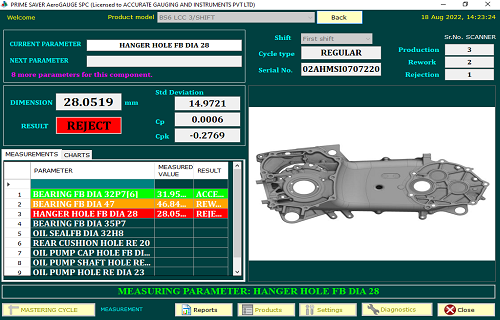
Mainpage
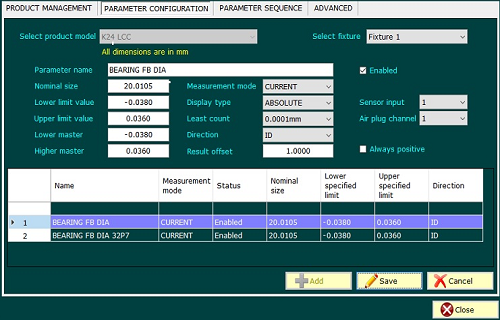
Parameter Configuration
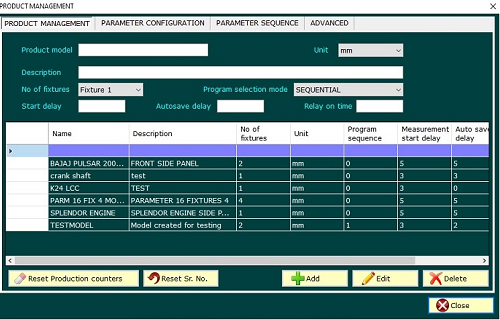
Product Management
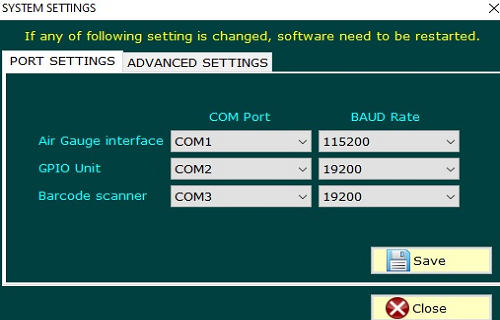
Port Settings
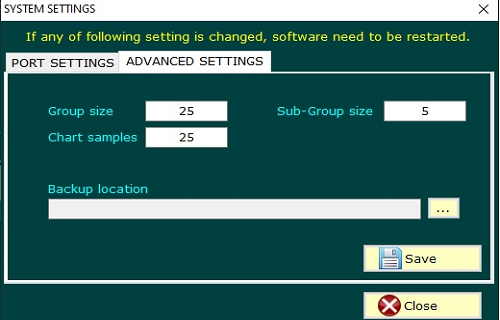
Advance Settings
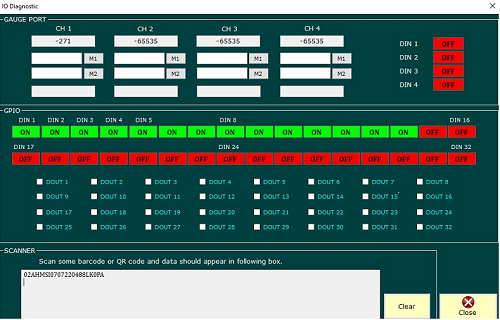
IO Diagnostic
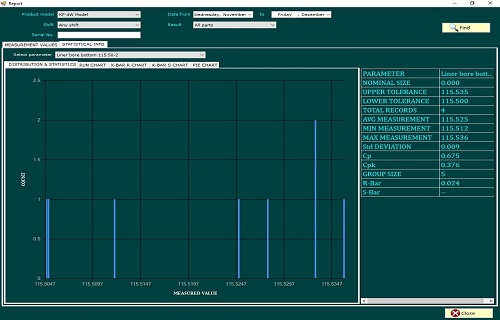
Report Histogram
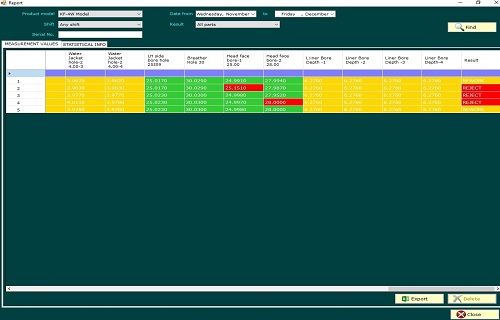
Report Measurement Values
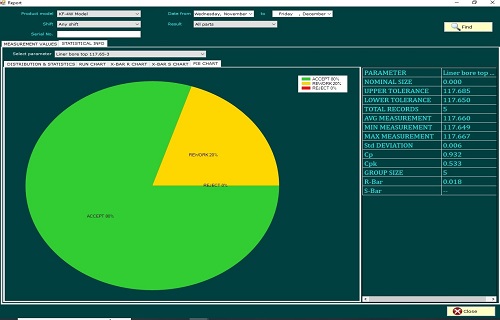
Report Pie Chart
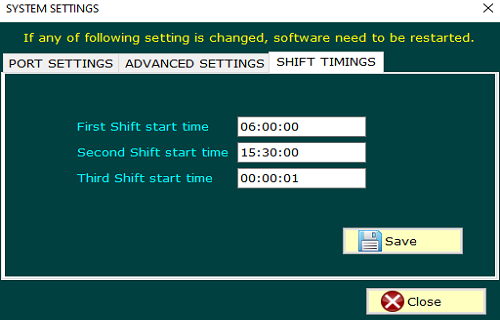
Shift Timimg
What is PrimeSaver application?
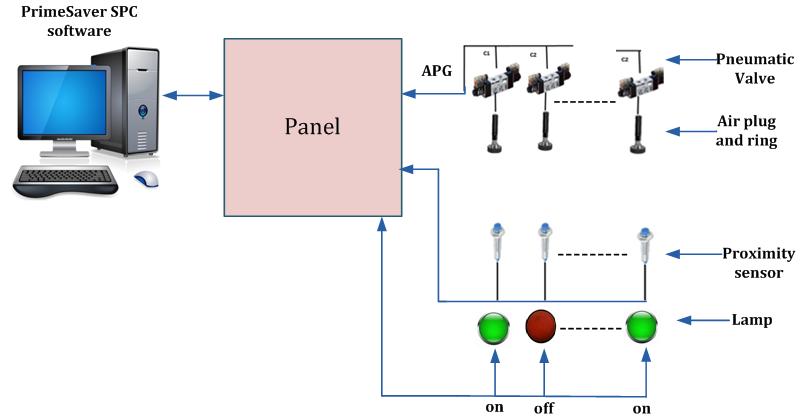
Air is turned on when any specific air gauge is picked up from its resting position.
Key features of Primesaver solution:
- PrimeSaverTM software are primarily used reduce wastage of air when not in use, contributing to cost savings and environmental sustainability.
- PrimeSaverTM ensures a friendly interface with clear layout, user-friendly messages, and visual indicators, making operation easy for all users.
- Dynamic arrows and indicator lamps guide operator to pick the correct gauge and take the measurement at correct bore.
- Up to 10GB of measurement data can be stored in database of PrimeSaverTM.
- Users benefit from real-time data displayed on the main screen report, enabling instant analysis and quick decision-making.
- Sequential activation of indicator lamps ensures users follow a systematic parameter monitoring cycle, preventing oversights and ensuring comprehensive data collection.
- Simultaneous display of up to four fixtures optimizes efficiency, addressing the needs of users monitoring multiple parameters concurrently.
- PrimeSaver uses easy-to-understand indicators like ‘Accept’, ‘Rework’, or ‘Reject’ in a clear display, and corresponding relay output are operated for connection to third party systems.
- Trend analysis feature in PrimeSaverTM keeps a history of past readings in a structured display, helping users see how things have changed over time. This is useful for looking at patterns and planning maintenance ahead of time.
- Users can set customizable alert thresholds, ensuring prompt notifications for abnormal readings and supporting preventative maintenance to minimize downtime.
- PrimeSaver features collectively contribute to an efficient and streamlined monitoring process, optimizing workflows and maximizing data accuracy from product selection to parameter monitoring.
- Parameter Check Modes: PrimeSaver offers flexibility in parameter checking by providing two distinct modes:
- Sequential Mode:Follows a predefined sequence, systematically checking each parameter in order.Ideal for structured and organized monitoring processes.
- Random Mode:Allows users to randomly check parameters by inserting plugs into the component. This mode is suitable for scenarios where a more flexible and varied approach to parameter checking is preferred.
- Low Air Pressure Alert: PrimeSaver includes a low air pressure alert feature, ensuring users are promptly notified if the air pressure falls below a specified threshold. This proactive warning helps prevent issues related to insufficient air pressure during the monitoring process.
- Data Backup Policy: PrimeSaver implements a robust data backup policy with regular intervals, including daily, weekly, monthly, and yearly selectable options. This ensures that users' data is consistently and securely stored, providing peace of mind and data reliability.
- Easy Report Generation: PrimeSaver simplifies the process of creating reports through its user-friendly interface. Users can effortlessly generate comprehensive reports in both CSV and PDF formats, ensuring flexibility in data analysis and convenient sharing. This feature allows users to export reports in their preferred format (.csv for data manipulation and .pdf for easy sharing and viewing).
-
PrimeSaverTM application features dynamic charts for comprehensive analysis:
- Histogram
- Run Chart
- X-bar R-Chart
- X-bar S-Chart
- Pie Chart
PRIMESAVER LITE
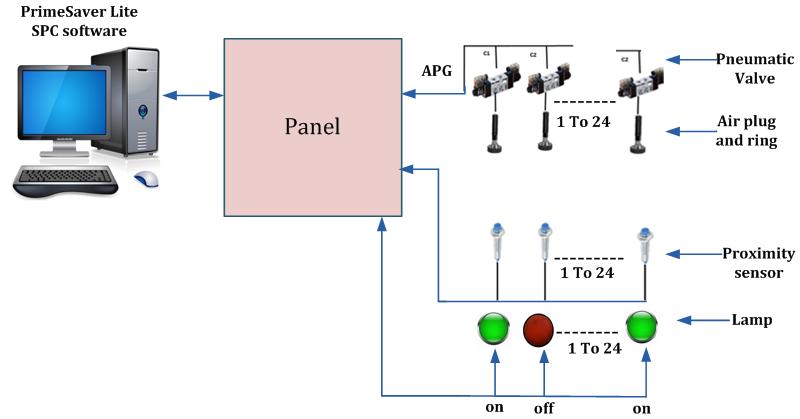
Air is turned on when any specific air gauge is picked up from its resting position.
PrimSaver Lite has the following features:
- Supports up to 24 air-gauge channels
- Excellent low-cost solution where wiring panel can be avoided.
- Up to 50 product models can be added in software. Specific product can be selected manually on main window.
- Product and rejection counters are maintained for operator’s quick view. These can be reset manually or automatically on daily basis.
- Online SPC charts and process capability indices help optimize quality much before the rejections occur.
- Sensitive settings such has master values, limit values etc are password protected.
- Absolute/relative mode of display for measured dimension.
- There are three modes for serial number.
- Automatic mode:Serial number increments automatically after every checked component.
- Manual mode:Before starting measurement of any new component, the software will wait for operator to enter serial number manually.
- Scanner mode:Before starting measurement of any new component, the software prompts operator to scan serial number using barcode scanner.
All the result of measurement is saved against specified serial number for future reference.
PRIMESAVER STANDARD
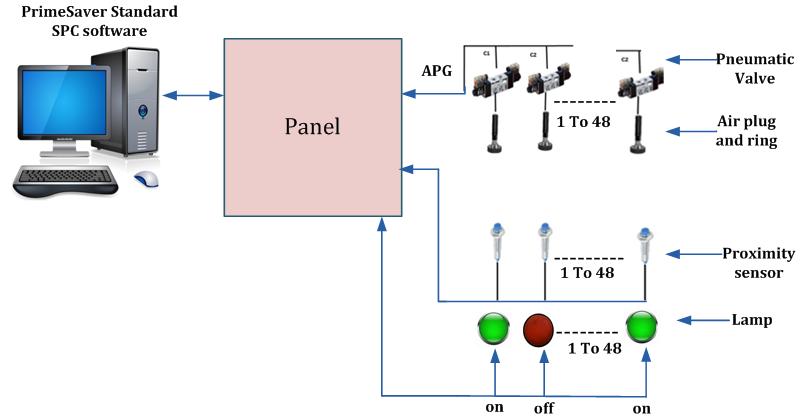
Air is turned on when any specific air gauge is picked up from its resting position.
PrimSaver Standard has the following features:
- Supports up to 48 air-gauge channels
- Up to 100 product models can be added in software.Specific product can be selected manually on main window or using scanner or selector switches.
- Product and rejection counters are maintained for operator’s quick view. These can be reset manually or automatically on daily basis.
- Lamp indication for each air-gauge. The indicator lamp provides easy way for the operator to decide which gauge to be picked for next parameter.
- Flexible configuration of IO channels for gauges and product models ensures system uptime even if any channel fails.
- This product supports inductive type of gauges and binary gauge input in addition to air gauges, if suitable GaugePort device is used.
In addition to the features of PrimeSaver Lite, this product offers below mentioned features.
PRIMESAVER PRO
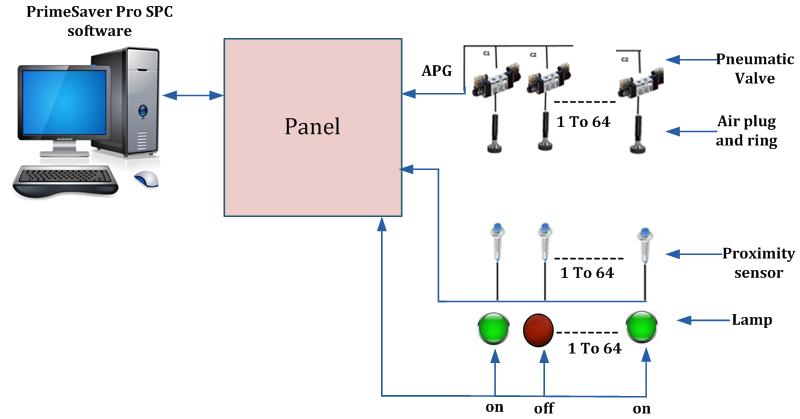
Air is turned on when any specific air gauge is picked up from its resting position.
PrimSaver Pro has the following features:
- Supports up to 64 air-gauge channels
- Any number of product models can be added in software. Specific product can be selected manually on main window or using scanner or digital input channel. Product selection using digital input requires separate GPIO device
- Product and rejection counters are maintained for operator’s quick view. These can be reset manually or automatically on daily basis.
- This product supports barcode printer, pin marking machine or laser marking machine to directly mark the tested component
- Protects the computer in case of a power outage by automatically shutting down the system after preset timeout.(Requires PowerMonTM device and a UPS to be connected separately)
In addition to the features of PrimeSaver Standard, this product offers below mentioned features
Offerings:
| SR NO. | PRODUCT | Deliverable |
|---|---|---|
| 1 | PrimeSaver lite |
|
| 2 | PrimeSaver Standard |
|
| 3 | PrimeSaver Pro |
|
Note: Software-only offering is available on demand.
Accessories:
| SR NO. | ACCESSORIES |
|---|---|
| 1 | GPIO |
| 2 | Relay Module |
| 3 | Serial cable |
| 4 | SMPS 24 VDC |
| 5 | Aero GaugePort |
| 6 | AeroGauge and Probe interface unit (Custom input combination in Gauge Port devices are available) |
| 7 | PowerMon device |
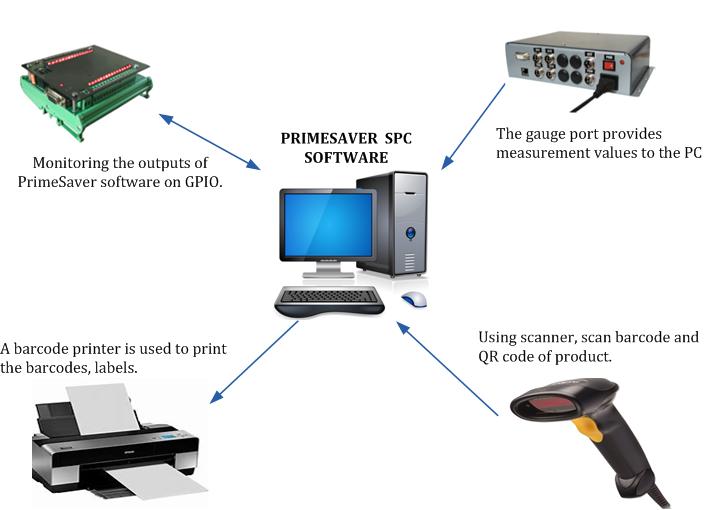
Many peripherals can be connected to PrimeSaver SPC software.